Introduction
A Datastar toolchain for Kotlin: an SDK for Ktor and Spring, assertions for your tests, an analysis for your CI, and two editor extensions.
Streamlord is a Datastar toolchain for Kotlin. With Datastar your server sends HTML and signal patches down one Server-Sent Events connection, and the browser applies them. There is no client bundle of yours to build, no JSON API to design, and no second model of your page living in a framework.
Streamlord is four tools, designed together. Adopt one, or all four:
- The SDK. Adapters for Ktor and Spring over one core that speaks the Datastar 1.0.5 protocol exactly.
- Assertions for your tests.
streamlord-testreads a response back into the events it carried, so a test says what the endpoint meant instead of comparing bytes. - The analysis. Datastar lives inside attribute values and Kotlin strings, where no compiler
looks.
streamlord-analysisreads them, and one test fails the build on a mistake in CI. - The editors. A VS Code extension and an IntelliJ plugin run the same analysis as you type, with the fix a click away.
The last two are the ones no other Datastar library on the JVM has.
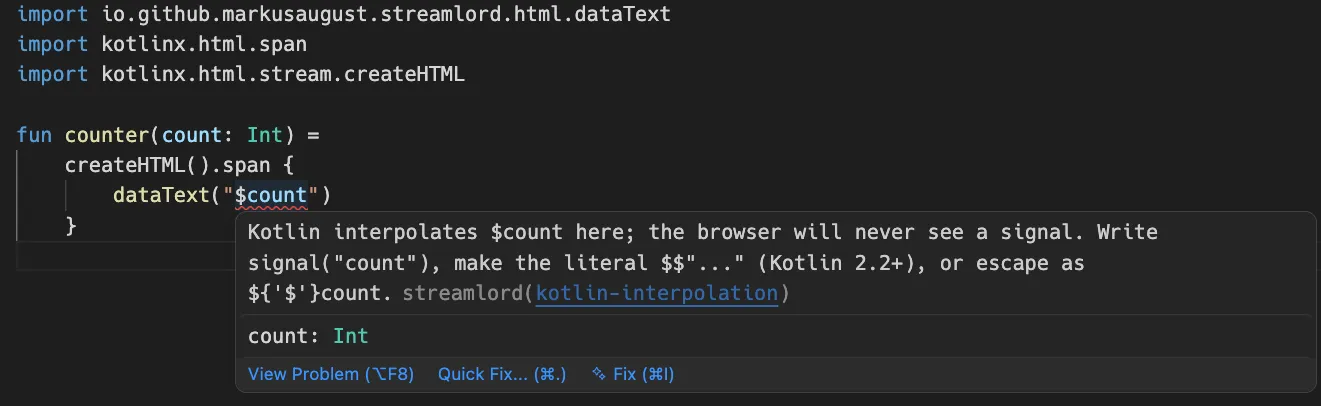
That is dataText( in VS Code. It compiles, because count is a parameter, and it would
send the browser whatever number count held instead of the signal $count. The editor marks it as an error before you
build, and the quick fix rewrites it to signal(. The same check runs in IntelliJ, and
in CI as a test you add, with no editor at all.
The same endpoint, twice
One route that adds a line to a list and updates a counter. First by hand, against the protocol:
get("/feed") {
    call.response.header("Cache-Control", "no-cache")
    call.response.header("X-Accel-Buffering", "no")
    if (call.request.local.version == "HTTP/1.1") {
        call.response.header("Connection", "keep-alive")
    }
    call.respondBytesWriter(ContentType.Text.EventStream) {
        writeStringUtf8("event: datastar-patch-elements\n")
        writeStringUtf8("data: selector #feed\n")
        writeStringUtf8("data: mode append\n")
        writeStringUtf8("data: elements <li>A new head hangs on the wall</li>\n\n")
        flush()
        writeStringUtf8("event: datastar-patch-signals\n")
        writeStringUtf8("data: signals {\"heads\":13}\n\n")
        flush()
    }
}
Then with Streamlord:
get("/feed") {
    call.respondDatastar {
        patchElements(selector = "#feed", mode = ElementPatchMode.APPEND) {
            li { +"A new head hangs on the wall" }
        }
        patchSignals("heads" to 13)
    }
}
Both send the same bytes, one event at a time, and the same headers to a request that keeps the connection open; the headers below say what the first gets wrong on one that asks to close it. The difference is what the first one leaves to you:
- Flushing. Every event needs its
flush(). Leave one out and the event waits in a buffer until the next flush or the end of the response, which on a stream that stays open can be minutes. Streamlord flushes after every event. - Markup over several lines. Every line needs its own
data: elementsprefix. Write"data: elements $html\n"with a newline insidehtml, and every line after the first is dropped; a blank line inside it ends the event early. Streamlord splits it for you. - A mode that needs a selector.
mode appendwithout aselectorline goes out by hand. Streamlord refuses to build it and throwsDatastarEventValidationExceptionwhere the event is constructed, before a byte of it is written. - The JSON. By hand you write the signals and escape them yourself. Streamlord encodes
"heads" to 13, or a data class through a codec. - The headers.
Cache-Control: no-cachebecause the specification asks for it,X-Accel-Buffering: nobecause nginx holds the stream back without it, andConnection: keep-aliveon HTTP/1.1 only, because HTTP/2 forbids it, and not to a request whoseConnectionheader asks to close. The version by hand still answers that one withkeep-aliveon CIO, Netty and Tomcat, where Tomcat sends its ownclosebeside it; Jetty drops thekeep-aliveitself.respondDatastarsets all three and reads the protocol version and the request’s ownConnectionitself.
Three ways to write markup
The DSL above is one of three, and none of them is the real one with the others tolerated beside
it. The same patch inside respondDatastar, written each way:
patchElements(selector = "#feed", mode = ElementPatchMode.APPEND) {
    li { +"A new head hangs on the wall" }
}patchElements(
"""<li>A new head hangs on the wall</li>""",
selector = "#feed",
mode = ElementPatchMode.APPEND,
)patchElements(
pebble.render("feed/head.peb", mapOf("text" to "A new head hangs on the wall")),
selector = "#feed",
mode = ElementPatchMode.APPEND,
)The template tab renders feed/, which holds <li>{{ text }}</li>. Every entry point
that takes HTML takes a String, so a template engine needs no integration: render, then pass
the result. Choosing a style compares them.
What you get
Two realms, served without favour. Ktor is the Sword, Spring is the Shield. Neither is the port the other was bolted onto: both are adapters over the same core, and Ktor and Spring WebMVC put identical bytes on the wire.
An encoder that cannot be talked into lying. Eight patch modes exist, and every mode except
outer and replace requires a selector. Streamlord refuses to construct an event the client
would reject, at the point you construct it, rather than letting you discover it in a browser
console.
Tests that say what the endpoint meant. events.
checks the event, not the bytes it was written as, and ignores what it did not ask about. It binds
no test framework, and it reads a Ktor test response, a Spring one, or a stream that stays open.
An analysis that reads what the compiler does not. The check your editor runs is a library.
Point one test at src/ and the build fails on an interpolated signal in a file no
editor ever opened.
Editors that read Datastar as a language. A VS Code extension and an IntelliJ plugin colour signals, actions and modifiers inside your Kotlin and your HTML, and say so when a modifier is misspelled. The code on this site is highlighted by the very same grammars.
What it costs you
Almost nothing, and that is deliberate. The core carries the Kotlin standard library and coroutines, and nothing else, not even a JSON library, because it has its own strict RFC 8259 parser and writer. The framework adapters compile against your framework and add no version of their own. You reach for a codec module only when you want data classes as signals.
dependencies {
    implementation("io.github.markusaugust.streamlord:streamlord-ktor:0.23.0")
    // Optional: the kotlinx.html DSL, and data classes as signals.
    implementation("io.github.markusaugust.streamlord:streamlord-html:0.23.0")
    implementation("io.github.markusaugust.streamlord:streamlord-json-kotlinx:0.23.0")
}
What it does not do
It does not render your pages for you, and it has no opinion about how you build HTML beyond giving you three ways to do it. It does not ship Datastar itself: the client bundle is yours to include, from a CDN or from your own static files. It does not ship Datastar Pro, and it never will; the Pro helpers emit the documented attribute names and nothing more, and the bundle and the licence are yours to bring.
And it does not guess. Where the protocol is ambiguous, Streamlord refuses rather than picks.
Every soul in Gallowmark knows my name, and not one knows my face. I took three rubies from the Iron Crown of Kell and the land fell apart in my hands. Now I will take one thing from you: the belief that the browser must be bought with JavaScript.
Sarn the Faceless, whom the river-priests of Thurn call the Lord of Streams